See the plan and the actual work.
Assign sets, reps and target weights. Review what the client logged against that prescription, so you can adjust the next session with the actual work in front of you.


For personal trainers · Pilot applications open
Write the programme. See what your clients actually lift. Give feedback they can use.
Bring client programmes, completed sets, messages, video reviews and bookings into one coaching workspace. Build packages around the support you offer.
For independent and gym-based PTs. Clients can train at any gym; NFC equipment is optional.
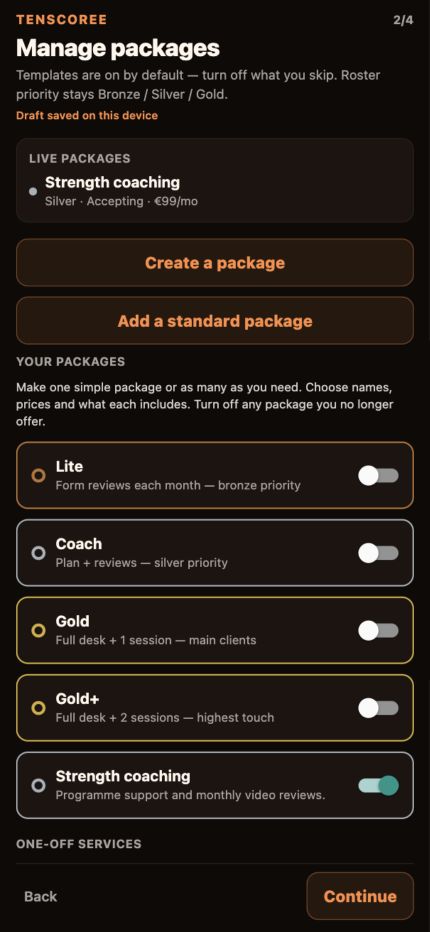
Actual package editor, shown in a browser preview with example data. €99 is illustrative, not a live offer.
Enlarge package editor ↗You train too
Use Coach for client programmes, messages and reviews. Tap Train myself for your own workout plan, set logging and progress. Switch back from the same account, without signing out.
The workspace selector is visible at the top of the coaching screenshot below. Coach mode is available to signed-in PT accounts.
Assign sets, reps and target weights. Review what the client logged against that prescription, so you can adjust the next session with the actual work in front of you.
Keep messages, check-ins, progress and shared recovery information with the client. Pick up the conversation with their training record close at hand.
Rate form only from a video the client sends you or a movement you observe in person. Keep a cue for their next attempt alongside the review.
Set your availability and manage booking requests alongside your client work, whether you coach online, in person or both.
Teach it your way
Add exercise photos, videos and written guide cues for your connected clients. Keep the demonstration close to the workout so clients can revisit the setup you taught them.
Your private content is shared with your connected clients. You can replace it as your coaching changes. Members can choose their gym’s guidance where available.
Form ratings: a coach’s judgement
A PT can give a form rating only when they have seen the movement: in a video the client sent them, or during an in-person session. A workout log on its own is not enough.
The client chooses to send a recording for review. Watch the movement, give your rating and leave a specific cue they can use next time.
During a session, rate the technique you actually watched. Keep your observation and coaching cue attached to the client.
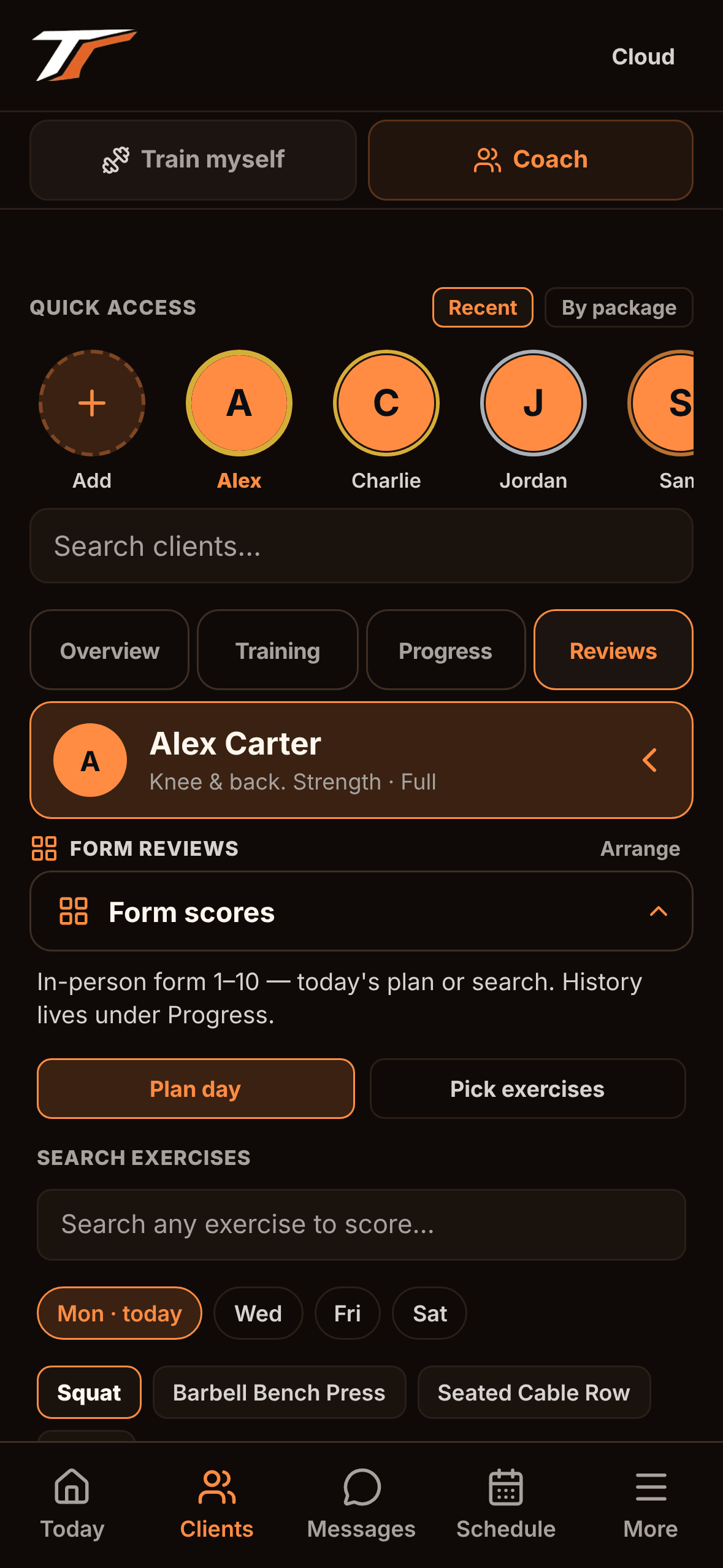
In-person review tools with sample client data and AI-generated demo portraits. The rating is the PT’s observation.
Enlarge screenshot ↗Your form rating is your assessment of a movement you saw. Camera-assisted counting and form feedback are separate tools for supported exercises; they are not a PT review.
AI accuracy and consistency are being tested with PTs during the pilot. Automatic estimates do not replace your assessment.
Classes, groups and messaging
Sign in on a computer with Coach & gym login and manage coaching from a full desktop dashboard, the same workspace you use in the app.
Schedule classes with a time, place and notes for a group, and everyone in it sees them in their app. Clients book one-to-one sessions from the times each PT makes available.
Put linked clients into groups, such as a beginners’ strength block, each with its own chat. Message clients one to one and check their logged training.
Add your own demonstration videos and technique cues for your clients, straight from your desktop.
The desktop dashboard is for PTs and gym staff. Clients train, log sets and use camera form feedback in the phone app. Classes are scheduled for linked clients in a group. Open drop-in booking for any member, with class capacity limits, is not available yet.
PT packages
Start with a standard package or create your own. Set the name, price and included support. Offer one straightforward option or several packages for different clients.
Set out the programme support and adjustments your client receives.
Specify the video reviews included, so clients know what feedback to expect.
Include in-person sessions, remote support or a combination that fits your coaching.
Review-only support keeps review tools in focus. Broader coaching packages add programme tools and other included support. The PT’s workspace follows the scope of that client’s coaching.
Reorder or hide optional panels to keep the desk manageable. Choose your preferred theme and light/dark appearance in Settings. Edit packages as your services change, while keeping existing clients’ agreed purchase terms intact.
These are examples, not fixed TENSCOREE package tiers. You keep 100% of what clients pay you — TENSCOREE takes no cut of your coaching income. Clients buy your packages on the TENSCOREE website. Payment availability is confirmed during pilot onboarding. Your packages do not grant access to a partner gym’s tagged floor.
Clients can follow your programmes at any gym. NFC equipment is optional and available at participating facilities; it is not a requirement for coaching.